As some of you may have noticed, in the initial release of OBDotNet the enumerator types are not mapped correctly. The proxy classes are generated but the parameter typemaps have a problem and no operators are overloaded. As a temporary fix, this gist contains some extension methods for enumerating atoms and bonds.
I threw this together kind of quickly and only did a little testing, so please email me if you see any bugs.
To demonstrate using these enumerators, here is a simple C# version of Noel's python script that calculated a circular fingerprint using the OBMolAtomBFSIter
Addendum: If your application is targeting v2.0 of the framework this MSDN article contains instructions on how to add support for extension methods. The relevant section is about 90% of the way down under the heading:
Extension Methods in .NET Framework 2.0 Apps
Tuesday, December 16, 2008

Sunday, December 14, 2008
Introduction to OBDotNet: Part 1
This tutorial is intended for C# developers looking to use OBDotNet to develop chemically aware applications and libraries. It assumes that the reader is familiar with OpenBabel or similar cheminformatics toolkits.
What follows is an overview of the core classes in the C# bindings for OpenBabel with an eye toward things that may confuse C# programmers who are unfamiliar with SWIG and C++. If you are completely new to OpenBabel start by skimming the documentation and the examples in the project wiki.
To install OBDotNet:
1)Download the current release
2)Unzip into the directory of your choice
3)Set an environment variable named BABEL_DATADIR to point to the data folder.
3)Register OBDotNet.dll in the GAC using gacutil.exe or the .Net management console.(optional)
Components:
OBDotNet currently consists of a single namespace: OpenBabel. It contains C# wrappers for all the publicly exposed classes, functions, and constants defined in the Open Babel library. It also contains a number of classes defined by SWIG that wrap arrays and STL types exposed by Open Babel. There are a few things that users need to be aware of if they are not familiar with SWIG.
1) The openbabel class
SWIG creates a module class that contains global constants and functions. The module class for OBDotNet is the openbabel class. Important methods belonging to the openbabel class include:
CartesianToInternal(vectorpInternalCoord arg0, OBMol mol)
InternalToCartesian(vectorpInternalCoord arg0, OBMol mol)
dot(OBVector3 a, OBVector3 b)
cross(OBVector3 a, OBVector3 b)
This is also where SWIG maps the values of macros and most enumerated constants from OpenBabel. For example the values in the OBGenericDataType enumeration are mapped to static fields of the openbabel class.
openbabel.PairData;
openbabl.RingData;
...
2) std::vector wrappers
SWIG generates wrapper it creates a class for each type of vector and array found in OpenBabel.
For example:
std::vector<string> -> vectorString.
These wrappers implement a type safe but non-generic IEnumerable. This means that foreach loops work without a cast but you can't call extension methods that target generic IEnumerables or use the copy constuctors of generic collection types. Use the Cast<T>() extension method to convert to a strongly typed IEnumerable<T>.
3) The double_array class
This is only one array wrapper in OBDotNet. It uses the basic SWIG array template which does not implement ICollection, has no indexer, and is not enumerable. Items are manipulated using the getitem(int n) and setitem(int m) methods.
4) SWIGTYPE
If you examine OBDotNet you'll see a lot of class names that look like this:
SWIGTYPE_p_istream.
These represent places where the SWIG type map was not able to create a C# proxy for a C++ type. These placeholder classes cannot be instantiated and have no methods. Any method that takes or returns one these types is currently unusable.
OBConversion:
The classes you will work with most often are the OBMol, OBAtom, OBBond, OBVector3, and OBConversion.
We'll start with OBConversion. Instances of the OBConversion class are used for reading and writing structure files, parsing miles and InChI strings, and converting between chemical file formats. Open Babel supports a large number of file formats. In C++ a instance of OBConversion can be created using the following constructor
OBConversion(std::istream *is=NULL, std::ostream *os=NULL)
Currently OBDotNet does not have support for wrapping std:istream and std:ostream. As a result we see our first SWIGTYPE:
OBConversion(SWIGTYPE_p_std__istream,SWIGTYPE_p_std__ostream)
So we'll have to use the default constuctor. This stream issue is common to most of the bindings. As a work around the OpenBabel developers added the Read/WriteFile and Read/WriteString methods to the class. These allow you to read and write data without exposing a stream. The Read/WriteString methods can be used with the "smi" or "inchi" formats to parse smiles or strings.
Here is a first test program to check your OBDotNet install. It creates an OBConversion and calls the GetSupportedInputFormat() and GetSupportedOutputFormat() to display the available file formats.
example 1: displaying the supported file formats
You should get a list of 93 input formats and 96 output formats.
The next example demonstrates reading structure data from an sdf file and writing out smiles strings.
example 2: reading an sdf file
This usage suggests definitely suggests a pattern, so our final example is a facade class to simplify reading structure files.
example 3: a facade class for reading files
Now we can just write
OBMol m = OBReader.ReadMol("capsaicin.mol);
or
IEnumerable<OBMol> dataSet = OBReader.ReadFiles("someMols.mol");
Returning the IEnumerable<OBMol> allows developers to use LINQ to Objects for filtering data sets.
foreach(OBMol mol in dataSet.Where(mol => mol.GetMW() < 500))
...
We'll look more at LINQ when we discuss descriptors in part 3.
That's it for part 1. After reading this you should be able to use OBDotNet to create OBMol objects from data in files or smiles/inchi strings. Part 2 will look at the OBAtom, OBMol, OBBond, and OBVector3 classes as well as the use of enumerators.
What follows is an overview of the core classes in the C# bindings for OpenBabel with an eye toward things that may confuse C# programmers who are unfamiliar with SWIG and C++. If you are completely new to OpenBabel start by skimming the documentation and the examples in the project wiki.
To install OBDotNet:
1)Download the current release
2)Unzip into the directory of your choice
3)Set an environment variable named BABEL_DATADIR to point to the data folder.
3)Register OBDotNet.dll in the GAC using gacutil.exe or the .Net management console.(optional)
Components:
OBDotNet currently consists of a single namespace: OpenBabel. It contains C# wrappers for all the publicly exposed classes, functions, and constants defined in the Open Babel library. It also contains a number of classes defined by SWIG that wrap arrays and STL types exposed by Open Babel. There are a few things that users need to be aware of if they are not familiar with SWIG.
1) The openbabel class
SWIG creates a module class that contains global constants and functions. The module class for OBDotNet is the openbabel class. Important methods belonging to the openbabel class include:
CartesianToInternal(vectorpInternalCoord arg0, OBMol mol)
InternalToCartesian(vectorpInternalCoord arg0, OBMol mol)
dot(OBVector3 a, OBVector3 b)
cross(OBVector3 a, OBVector3 b)
This is also where SWIG maps the values of macros and most enumerated constants from OpenBabel. For example the values in the OBGenericDataType enumeration are mapped to static fields of the openbabel class.
openbabel.PairData;
openbabl.RingData;
...
2) std::vector wrappers
SWIG generates wrapper it creates a class for each type of vector and array found in OpenBabel.
For example:
std::vector<string>
These wrappers implement a type safe but non-generic IEnumerable. This means that foreach loops work without a cast but you can't call extension methods that target generic IEnumerables or use the copy constuctors of generic collection types. Use the Cast<T>() extension method to convert to a strongly typed IEnumerable<T>.
OBConversion obc = new OBConversion();
vectorString inFormats = obc.GetSupportedInputFormat();
List molFormats = new List(inFormat.Cast<string>());

foreach(string frmt in molFormats.Where(s => s.ToLower().Contains("mdl")))
...
3) The double_array class
This is only one array wrapper in OBDotNet. It uses the basic SWIG array template which does not implement ICollection, has no indexer, and is not enumerable. Items are manipulated using the getitem(int n) and setitem(int m) methods.
4) SWIGTYPE
If you examine OBDotNet you'll see a lot of class names that look like this:
SWIGTYPE_p_istream.
These represent places where the SWIG type map was not able to create a C# proxy for a C++ type. These placeholder classes cannot be instantiated and have no methods. Any method that takes or returns one these types is currently unusable.
OBConversion:
The classes you will work with most often are the OBMol, OBAtom, OBBond, OBVector3, and OBConversion.
We'll start with OBConversion. Instances of the OBConversion class are used for reading and writing structure files, parsing miles and InChI strings, and converting between chemical file formats. Open Babel supports a large number of file formats. In C++ a instance of OBConversion can be created using the following constructor
OBConversion(std::istream *is=NULL, std::ostream *os=NULL)
Currently OBDotNet does not have support for wrapping std:istream and std:ostream. As a result we see our first SWIGTYPE:
OBConversion(SWIGTYPE_p_std__istream,SWIGTYPE_p_std__ostream)
So we'll have to use the default constuctor. This stream issue is common to most of the bindings. As a work around the OpenBabel developers added the Read/WriteFile and Read/WriteString methods to the class. These allow you to read and write data without exposing a stream. The Read/WriteString methods can be used with the "smi" or "inchi" formats to parse smiles or strings.
Here is a first test program to check your OBDotNet install. It creates an OBConversion and calls the GetSupportedInputFormat() and GetSupportedOutputFormat() to display the available file formats.
example 1: displaying the supported file formats
You should get a list of 93 input formats and 96 output formats.
The next example demonstrates reading structure data from an sdf file and writing out smiles strings.
example 2: reading an sdf file
This usage suggests definitely suggests a pattern, so our final example is a facade class to simplify reading structure files.
example 3: a facade class for reading files
Now we can just write
OBMol m = OBReader.ReadMol("capsaicin.mol);
or
IEnumerable<OBMol> dataSet = OBReader.ReadFiles("someMols.mol");
Returning the IEnumerable<OBMol> allows developers to use LINQ to Objects for filtering data sets.
foreach(OBMol mol in dataSet.Where(mol => mol.GetMW() < 500))
...
We'll look more at LINQ when we discuss descriptors in part 3.
That's it for part 1. After reading this you should be able to use OBDotNet to create OBMol objects from data in files or smiles/inchi strings. Part 2 will look at the OBAtom, OBMol, OBBond, and OBVector3 classes as well as the use of enumerators.
Friday, November 21, 2008
ChemSharp - should have googled it first
Then I would have known about this...
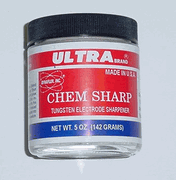
"The safest way to sharpen tungsten without grinding."

"The safest way to sharpen tungsten without grinding."
Thursday, November 13, 2008
CSInChI v0.5 Released
The first product of the ChemSharp project is now available to the public. The CSInChI library allows programmers to call the IUPAC InChI library from CLR languages. It is compatible with Iron Python as well although Python programmers should read up on how IPy handles value types and using the clr.Reference class with methods that take out and ref parameters.
CSInChI is designed as a stand alone library which is used by ChemSharp but not dependent on the rest of the project.
This is a beta release so it's a little rough and people should expect that breaking changes may be made between now and the eventual 1.0 release. Using the default constructors of the structs and then initalizing the fields will be the best way to ensure compatibility with future releases.
The next few posts will contain examples of how to use this library. More examples are included in the documentation.
CSInChI can be downloaded from this link.
Questions and comments can be directed either to me or to the CSInChI mailing list at chemsharp-csinchi@lists.sourceforge.net
CSInChI is designed as a stand alone library which is used by ChemSharp but not dependent on the rest of the project.
This is a beta release so it's a little rough and people should expect that breaking changes may be made between now and the eventual 1.0 release. Using the default constructors of the structs and then initalizing the fields will be the best way to ensure compatibility with future releases.
The next few posts will contain examples of how to use this library. More examples are included in the documentation.
CSInChI can be downloaded from this link.
Questions and comments can be directed either to me or to the CSInChI mailing list at chemsharp-csinchi@lists.sourceforge.net
Wednesday, November 12, 2008
Languages available for use with the CLR
A recent post to the OpenBabel mailing list reminded me that many scientists who write .Net code are not fully aware of the wide array of compatible languages. In fact most popular programming languages and many not so popular ones have been ported to the CLR. The list includes:
A# (Ada)
NetCobol
IronRuby
S# (Small Talk)
FTN95 (Fortran)
F# (OCaml)
and many more...
A fairly complete list is posted here.
A# (Ada)
NetCobol
IronRuby
S# (Small Talk)
FTN95 (Fortran)
F# (OCaml)
and many more...
A fairly complete list is posted here.
Sunday, November 9, 2008
Science Code .Net and Numerical Recipes
Here is an interesting project:
http://www.sciencecode.com/
It seems to be an effort to implement the classic Numerical Recipes and provide classes to do some common Physics/Math calculations from C#. When I get a chance I'll be trying it out and posting a review. If any one has some experience with it comment and let me know what you thought of it.
http://www.sciencecode.com/
It seems to be an effort to implement the classic Numerical Recipes and provide classes to do some common Physics/Math calculations from C#. When I get a chance I'll be trying it out and posting a review. If any one has some experience with it comment and let me know what you thought of it.
Friday, November 7, 2008
Interop Example: Marshalling Structures To The InChI Library
For the last week I've been finishing up CSInChI a library for using the IUPAC InChI library from C#. For those not acquainted with it, the InChI (International Chemical Identifier) is the a line notation used to represent molecular structures. Line notations are simply ways of encoding a structure as text string. Since the official InChI api provided by the IUPAC is written in C I thought this would be a good time to post an interop example. This tutorial will illustrate how to call an unmanaged function that takes structures as parameters using Platform Invoke.
The InChI library can be downloaded from: http://www.iupac.org/inchi/
In this example we'll tackle the function:
int GetStructFromINCHI(inchi_InputINCHI *inpInChI, inchi_OutputStruct *outStruct)
This function takes 2 C structs as parameters and returns an integer error code. The first one holds two strings, the inchi and a string of options.
typedef struct tagINCHI_InputINCHI {
/* the caller is responsible for the data allocation and deallocation */
char *szInChI; /* InChI ASCIIZ string to be converted to a strucure */
char *szOptions; /* InChI options: space-delimited; each is preceded by */
/* '/' or '-' depending on OS and compiler */
} inchi_InputINCHI;
We'll begin by creating a matching C# structure
public struct InChI_String_Input
{
public string inchiString;
public string options;
}
In this case we get surprisingly lucky and this struct marshals just fine with no additional attributes. The key thing here is to make sure that the fields are listed in the same order as in the unmanaged structure and that the type of each field is the same size as the C type. By default the C# compiler lays out the fields of a struct sequentially. If you want to use a class you must apply the [StructLayout(LayoutKind.Sequential)] attribute.
The C struct that holds the output from the function looks like this:
typedef struct tagINCHI_OutputStruct {
inchi_Atom *atom;
inchi_Stereo0D *stereo0;
S_SHORT num_atoms;
S_SHORT num_stereo0;
char *szMessage;
char *szLog;
unsigned long WarningFlags[2][2];
}inchi_OutputStruct;
A C# equivalent looks something like this:
using System;
using System.Runtime.Interop;
public struct InChI_Struct_Output
{
public IntPtr AtomsPtr;
public IntPtr StereoPtr;
public short NumAtoms;
public short NumStereo0D;
public string Message;
public string Log;
[MarshalAs(UnmanagedType.ByValArray, SizeConst = 4)]
public ulong[] WarningFlags;
}
The details of the inchi_Atom and inchi_Stereo0D structures will be discussed in a future post. For now we're only going worry about how to marshal arrays. Because a C style array is represented by a pointer to the first item in the array the C# equivalent is the IntPtr class from the InteropServices namespace. The WarningFlags array has to be changed to a 1-D array with the same total capacity because the CLR does not support marshaling nested arrays. Note that the MarshalAs attribute specifies a size. This is required both because the array has a fixed size in C and because the CLR needs to know the runtime size of an array in order to marshal it.
To convert the pointer representing a C style array to an array of C# structures write a method that takes the pointer and increments it by the size of the structure it represents calling the Marshal.PtrToStructure method at each iteration to convert the pointer to a C# structure.
public InChI_Atom[] GetAtoms()
{
int atomSize = Marshal.SizeOf(typeof(InChI_Atom));
InChI_Atom[] iAtoms = new InChI_Atom[NumAtoms];
InChI_Atom a;
IntPtr pAtom = AtomsPtr;
for (int i = 0; i < iAtoms.Length; i++)
{
a = (InChI_Atom)Marshal.PtrToStructure(pAtom, typeof(InChI_Atom));
iAtoms[i] = a;
pAtom = new IntPtr((int)pAtom + atomSize);
}
return iAtoms;
}
Finally we create a class to hold the methods that access the unmanged dll.
public static class LibInChI
{
[DllImport("libinchi.dll", EntryPoint = "GetStructFromINCHI")]
public static extern int ParseInChI(ref InChI_String_Input input, out InChI_Struct_Output output)
...
...
}
To call the method:
//All fields need to be set to non-null values
InChI_String_Input inp;
inp.Options = "";
string inchi = "InChI=1/H3N/h1H3";
InChI_Struct_Output outStruct;
int retVal = LibInChI.ParseInChI(ref inp, out outStruct);
Note the use of the ref and out keywords. When ref and out parameters are marshaled they are interpreted as &theParam. Remember that if a method has any ref or out parameters the keywords must be explicitly specified each time the method is called.
Thats it for today. The next interop example will look at the InChI_Atom struct and how to ensure that unmanaged resources are freed. For those who are interested, CSInChI will be available within the next week (fingers crossed!) from the ChemSharp project. http://sourceforge.net/projects/chemsharp
The InChI library can be downloaded from: http://www.iupac.org/inchi/
In this example we'll tackle the function:
int GetStructFromINCHI(inchi_InputINCHI *inpInChI, inchi_OutputStruct *outStruct)
This function takes 2 C structs as parameters and returns an integer error code. The first one holds two strings, the inchi and a string of options.
typedef struct tagINCHI_InputINCHI {
/* the caller is responsible for the data allocation and deallocation */
char *szInChI; /* InChI ASCIIZ string to be converted to a strucure */
char *szOptions; /* InChI options: space-delimited; each is preceded by */
/* '/' or '-' depending on OS and compiler */
} inchi_InputINCHI;
We'll begin by creating a matching C# structure
public struct InChI_String_Input
{
public string inchiString;
public string options;
}
In this case we get surprisingly lucky and this struct marshals just fine with no additional attributes. The key thing here is to make sure that the fields are listed in the same order as in the unmanaged structure and that the type of each field is the same size as the C type. By default the C# compiler lays out the fields of a struct sequentially. If you want to use a class you must apply the [StructLayout(LayoutKind.Sequential)] attribute.
The C struct that holds the output from the function looks like this:
typedef struct tagINCHI_OutputStruct {
inchi_Atom *atom;
inchi_Stereo0D *stereo0;
S_SHORT num_atoms;
S_SHORT num_stereo0;
char *szMessage;
char *szLog;
unsigned long WarningFlags[2][2];
}inchi_OutputStruct;
A C# equivalent looks something like this:
using System;
using System.Runtime.Interop;
public struct InChI_Struct_Output
{
public IntPtr AtomsPtr;
public IntPtr StereoPtr;
public short NumAtoms;
public short NumStereo0D;
public string Message;
public string Log;
[MarshalAs(UnmanagedType.ByValArray, SizeConst = 4)]
public ulong[] WarningFlags;
}
The details of the inchi_Atom and inchi_Stereo0D structures will be discussed in a future post. For now we're only going worry about how to marshal arrays. Because a C style array is represented by a pointer to the first item in the array the C# equivalent is the IntPtr class from the InteropServices namespace. The WarningFlags array has to be changed to a 1-D array with the same total capacity because the CLR does not support marshaling nested arrays. Note that the MarshalAs attribute specifies a size. This is required both because the array has a fixed size in C and because the CLR needs to know the runtime size of an array in order to marshal it.
To convert the pointer representing a C style array to an array of C# structures write a method that takes the pointer and increments it by the size of the structure it represents calling the Marshal.PtrToStructure method at each iteration to convert the pointer to a C# structure.
public InChI_Atom[] GetAtoms()
{
int atomSize = Marshal.SizeOf(typeof(InChI_Atom));
InChI_Atom[] iAtoms = new InChI_Atom[NumAtoms];
InChI_Atom a;
IntPtr pAtom = AtomsPtr;
for (int i = 0; i < iAtoms.Length; i++)
{
a = (InChI_Atom)Marshal.PtrToStructure(pAtom, typeof(InChI_Atom));
iAtoms[i] = a;
pAtom = new IntPtr((int)pAtom + atomSize);
}
return iAtoms;
}
Finally we create a class to hold the methods that access the unmanged dll.
public static class LibInChI
{
[DllImport("libinchi.dll", EntryPoint = "GetStructFromINCHI")]
public static extern int ParseInChI(ref InChI_String_Input input, out InChI_Struct_Output output)
...
...
}
To call the method:
//All fields need to be set to non-null values
InChI_String_Input inp;
inp.Options = "";
string inchi = "InChI=1/H3N/h1H3";
InChI_Struct_Output outStruct;
int retVal = LibInChI.ParseInChI(ref inp, out outStruct);
Note the use of the ref and out keywords. When ref and out parameters are marshaled they are interpreted as &theParam. Remember that if a method has any ref or out parameters the keywords must be explicitly specified each time the method is called.
Thats it for today. The next interop example will look at the InChI_Atom struct and how to ensure that unmanaged resources are freed. For those who are interested, CSInChI will be available within the next week (fingers crossed!) from the ChemSharp project. http://sourceforge.net/projects/chemsharp
Subscribe to:
Posts (Atom)